Every big idea begins with a spark, the moment you think, “This could really work.” You have the name, the brand, maybe even your first product. Naturally, the next step is bringing it all to life with a professional website.
You envision something clean, modern, and easy for your customers to use. So, you pick a template and start designing. A few hours later, you’re wrestling with issues you never expected: buttons that don’t work, forms that won’t submit, layouts that fall apart the moment you check them on mobile.
If this sounds familiar, you’re not alone. Many clients run into these frustrations because most web development challenges come from simple, but avoidable mistakes. Here are the most common ones and how you can steer clear of them.
1. Jumping In Without a Plan

It’s tempting to dive straight into designing your site. But skipping the planning stage is a lot like trying to decorate a house before it’s even built, things may look good in your head, but they quickly fall apart in reality.
Why planning matters?
Better usability = happier visitors: Studies consistently show that focusing on usability (how easy a site is to use) leads to better user satisfaction, and that means more people stick around and convert.
Organization helps: A well-defined information makes navigation intuitive and reduces confusion. Research shows that poor navigation frustrates users and leads them away.
Less waste, lower cost: When you plan your content and pages before building, you avoid rework. It’s cheaper and faster to fix roadmap issues than to redesign everything later.
User-centered wins: Doing a little user research at the start helps create a website that real users will enjoy. That improves usability, engagement, and ultimately your conversion.
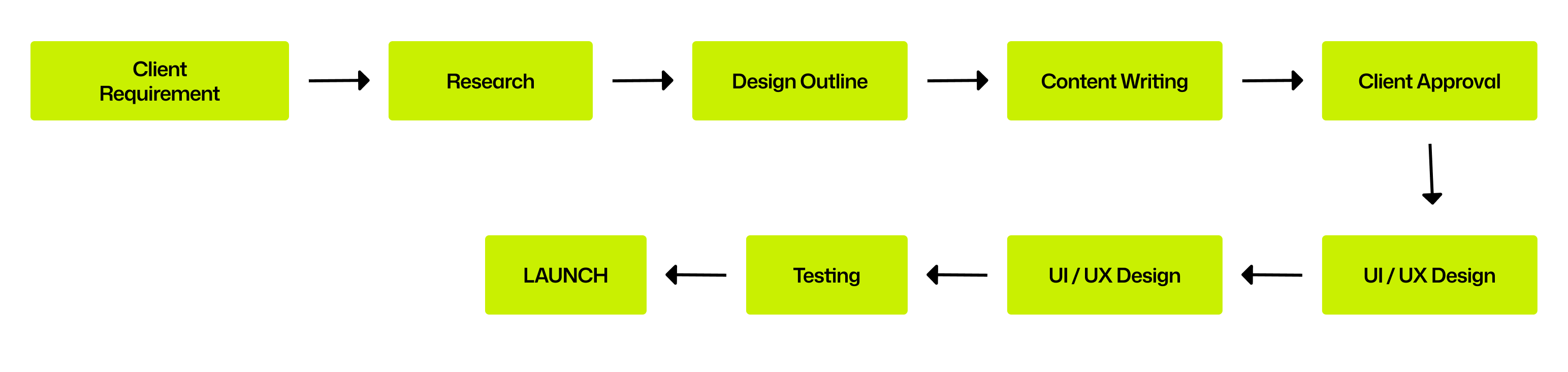
2. Forgetting About Mobile Users
Mobile Users Aren’t Just a Niche… They’re Everyone As of early 2025, about 63-64% of global web traffic comes from mobile devices.
According to a recent report 63.05% of all web page requests globally originate from mobile browsers. In many regions across Asia, Africa, and the Middle East, mobile usage is even higher — often 70–80%.
On the user side, the GSMA says there are 4.6 billion people who use mobile internet on their own devices.
Why This Matters for Website Design?
Since most users are on mobile, designing only for desktop means you risk losing a majority of your audience.
Bad mobile experience can hurt your SEO.
On mobile, people expect fast, clean, and simple interfaces, especially because they’re often on the go, or using limited data.
What You Should Do?
Build your site with responsive design so layouts adapt to any screen size.
Test across devices ,not just high-end phones, but older/entry-level mobiles too.
Keep things lightweight and clutter-free, minimal design helps load times and usability.
Focus on mobile performance, not just aesthetics — page speed, touch targets, and readability are crucial.
3. Slow Loading Speeds
Did you know?!
Around 53% of mobile users worldwide leave a website if it takes more than 3 seconds to load.
According to a huge global analysis, the average mobile page takes 8.6 seconds to fully load, far above what users expect.
A delay of just 2 seconds can more than double the bounce rate, in some studies, bounce rate went up by 103% for slower pages.
What is the Impact on your Business
Faster sites convert better: In one global study, pages that loaded in under 3 seconds had much lower bounce rates compared to slower ones.
Every extra second of load time costs conversions: For example, one company saw a 7% drop in conversions when load time grew by 1 second.
Over time, slow load times are very costly. For instance, even a 0.1 s improvement in load speed was found to significantly boost conversion rates in e-commerce contexts.

What the Research Tells Us to Do
Optimize images: Use tools to compress them, and use WebP/AVIF.
Clean up your JavaScript: Remove or delay unused scripts so they don’t block page rendering.
Enable caching: Let repeat visitors load certain resources faster from their own device, rather than re-downloading all assets.
Keep an eye on important speed metrics like how fast the main content shows up (LCP) and how long it takes before the page becomes usable (TTI). These help you spot what’s slowing your site down.
4. Messy Navigation
Here’s something UX studies around the world agree on, If people can’t find what they’re looking for in a few clicks, they’ll leave. It doesn’t matter if a user is in India, the US, Europe, or anywhere else.
Clear navigation is one of the biggest factors that keeps people on a website.
Simplifying navigation has been shown to improve conversion rates by 15–35%.
Global usability research shows that
Simple, predictable menus help users move through a site faster.
Confusing labels or cluttered menus increase frustration and bounce rates.
When navigation is too complicated, users often abandon the site.
How to improve?
Keep menu items to 5–7, Cognitive psychology research (like Miller’s Law) suggests.
Provide a search bar if your site has a lot of content. It helps users who don’t want to scroll through the menu.
Stick to simple names: Home, About, Contact.
Add breadcrumb navigation for easy backtracking.
5. Ignoring Accessibility
Globally, 1.3 billion people (about 16% of the world’s population) live with some form of disability, according to the WHO. And it’s not just permanent disabilities: millions have temporary or situational challenges, like a broken arm, poor internet, or even bright sunlight on their screen.
Despite this massive user base, WebAIM’s 2024 analysis found that 96.1% of the world’s top 1 million homepages fail basic accessibility checks.
Most common global accessibility issues:
Missing alt text on images, consistently one of the top failures (WebAIM).
Low text-to-background contrast, affects 83% of websites tested.
Buttons, menus, or forms not usable via keyboard, critical for people relying on keyboard-only navigation.
Lack of captions, affecting the 430 million people worldwide with disabling hearing loss (WHO).
How to improve?
Keep menu items to 5–7, Cognitive psychology research (like Miller’s Law) suggests.
Provide a search bar if your site has a lot of content. It helps users who don’t want to scroll through the menu.
Stick to simple names: Home, About, Contact.
Add breadcrumb navigation for easy backtracking.

What can be done?
Add accurate, descriptive alt text to every image.
Ensure buttons, menus, and forms are fully accessible via keyboard, no mouse required.
Use tools like Google Lighthouse, WAVE Evaluation Tool, or Deque axe to detect accessibility issues.
Add captions and transcripts for videos to support global hearing accessibility.
Use color palettes that meet WCAG global contrast standards (4.5:1 for normal text).
6. Forgetting SEO Basics
Skipping SEO is like building a storefront and not naming your street, you might have the best place, but no one knows how to find you.
SEO isn’t just technical word, it’s how people and search engines (especially Google) discover your site.
Why SEO Matters Globally?
About 53% of all website traffic comes from organic search.
Over 91% of the global search engine market is by Google.
Despite SEO being so important, many pages get zero organic traffic: over 94–96% of pages don’t get any Google search traffic.
91% of marketers said SEO positively impacted their website performance in 2024.
Easy SEO habits
Write clear titles + meta descriptions
Use clean, logical URLs
Use proper headings & keywords.
Use tools like Google Search Console to check how your pages are indexed, see what queries bring traffic, and fix issues.
Use Lighthouse, Screaming Frog, or any SEO auditing tool to catch missing titles, bad URLs, or missing headings.
7. Weak Security
Around 30,000 sites get hacked daily and estimates 4.1 million websites have malware.
SMEs often lack cybersecurity awareness, funding, and education, making them more vulnerable to attacks.

How to stay safe?
Turn on HTTPS/SSL, it protects your visitors and boosts SEO.
Use strong passwords + enable 2-factor authentication.
Keep everything updated, plugins, themes, CMS. Updates patch security holes.
8. Too many plugins
Plugins are great… until you start adding them like toppings on a pizza. The more you stack, the heavier your website becomes, and eventually it starts slowing down, breaking, or acting weird. Report shows that in first half of 2025, 89% of all reported vulnerabilities came from plugins.
Plugins significantly increase the “attack surface” because many remain outdated or poorly maintained
In 2023 alone, 827 plugins and themes were reported as abandoned.
Avoid plugin overload by:
Only keeping what you actually use.
Deleting old or unused plugins, they’re security risks too.
Learning tiny bits of code for small changes instead of using a whole plugin for something simple.
9. Skip Testing
You’ll be surprised how many people hit “publish” without even checking their website. Then later they find out the contact form never worked, half the images broke, or the homepage looks totally weird on Safari.
Cross-browser inconsistencies are a major reason for broken layouts and missing features.
Page Speed Impacts Everything. A Google study found that if a page takes more than 3 seconds to load, 53% of users leave.
Research shows that poor form usability causes huge drop-offs in leads and conversions.
Before launching, always check:
How your site looks on different browsers (Chrome, Safari, Firefox, Edge).
Whether all links, forms, and buttons work.
Page speed on desktop and mobile.
How your site behaves on different screen sizes.
10. Not backing up your site
Let’s be honest — most people don’t think about backups until something goes horribly wrong. Websites crash, plugins glitch, updates break layouts… and suddenly the whole site looks like a digital crime scene. If you don’t have a backup, you might lose all your hard work in seconds.
Protect yourself:
Use automatic backups like Bluehost SiteGround Hostinger
Don’t edit directly on the live site.
Use version control (like Git) if possible.
This website is Sustainable, Fast & Privacy-friendly.

97/100
Sustainable Score

100%
Renewable Energy

0.2 sec
Page Load Speed

Zero
Cookies, & tracking

Follow Us


Our Website Score
Green Web Foundation

Our SDG


We are members of



A brand of Venzo Technologies❤
Copyrights Reserved @ Kytz Labs